

How to Complete Your KYC on Daba in Less Than 5 Minutes
4 min Read September 10, 2026 at 11:11 AM UTC

Before you can invest in stocks, bonds, funds, IPOs, or savings products on Daba, there’s one quick step standing between you and the markets: KYC (Know Your Customer) verification. The good news? It’s fast, fully digital, and can be done on either the web platform or the Daba mobile app — right after you create your account.
Here’s exactly how it works, step by step, plus tips to make sure your verification sails through on the first try.
Step 1: Create Your Daba Account
Head to dabafinance.com/register and create your Daba account. This takes just a few minutes — enter your details, set up your login, and you’re in. You can do this from your browser on the desktop or straight from the Daba app on your phone.
Step 2: Choose Individual or Business Onboarding
Once your account is created, you’ll be asked to choose how you want to onboard:
- Individual — for personal investing
- Business / Entity — for trusts, personal investment companies, family investment vehicles, and other corporate structures
Both paths are fully supported and lead to the same place: full access to every product on the Daba platform. The main difference is that business onboarding (KYB — Know Your Business) is somewhat more document-intensive, since additional entity documentation is required. Beyond that, the access, execution, and repatriation mechanics are identical for individuals and businesses alike.
Step 3: Complete Your KYC (or KYB) Verification
This is the core of the process — and the part most people worry will be complicated. It isn’t. Daba’s onboarding flow guides you through exactly what’s needed, and for most individuals it takes less than 5 minutes to complete.
What You’ll Need
- A valid government-issued ID (passport, national ID, or driver’s license)
- A selfie/live photo for identity matching
- For businesses: incorporation documents, proof of registration, and identification for authorized signatories/beneficial owners
How to Get It Right the First Time
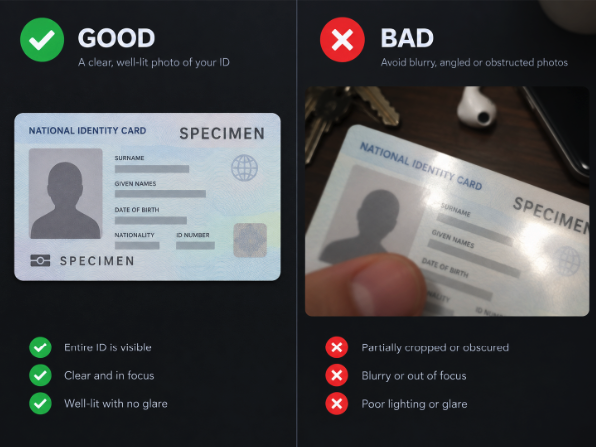
The single biggest reason KYC gets delayed is poor-quality document photos. Here’s how to avoid that:
- Use good, even lighting — natural daylight near a window works best. Avoid dim rooms, harsh overhead lighting, or backlighting that casts shadows on your ID.
- Keep the image sharp and in focus — hold your camera steady and make sure the text on your document is fully legible before you submit.
- Capture the entire document — all four corners should be visible, with no cropping, cut-off edges, or fingers covering any part of the ID.
- Avoid glare and reflections — laminated IDs are especially prone to glare under bright light or camera flash; angle the document slightly if needed.
- Use a plain, contrasting background — placing your ID on a flat, single-colored surface (like a dark table) helps the system read it clearly.
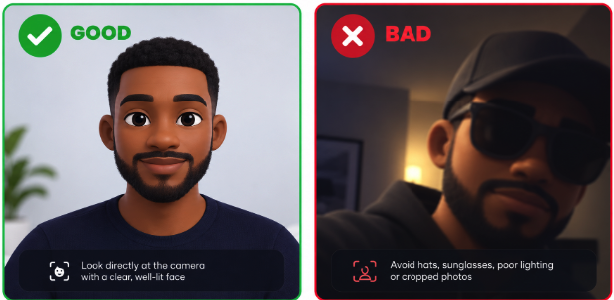
- For your selfie — face the camera directly, remove sunglasses or hats, and make sure your face is clearly visible and well-lit.
A quick way to check yourself: if you can zoom into your photo and read every line of text clearly, with no blur, glare, or shadows, you’re good to go. (Plenty of example “good ID photo vs. bad ID photo” comparisons are available online if you want a visual reference before you start.)
Step 4: Submit and Wait for Verification
Once you’ve uploaded your documents, submit your application. Daba’s verification system reviews everything and, once approved, unlocks your account for deposits and investing — across stocks, bonds, managed funds, collections, and IPOs, including the Dangote Refinery IPO.
Do It On Web or Mobile — Your Choice
One of the best parts of Daba’s onboarding experience is flexibility. You can complete your entire KYC:
- On the web, right after registering at dabafinance.com
- On mobile, through the Daba app, immediately after account creation
Whichever device you’re on, the flow is the same — quick, guided, and designed to get you investing as fast as possible.
KYC Is a One-Time Step — With Lifetime Access
Here’s the key thing to remember: KYC is not a one-off gate for a single opportunity — it’s a one-time step that unlocks the entire Daba platform. Once verified, you don’t need to repeat the process to access new IPOs, new markets, or new products. You’re set up to invest across all of Daba, indefinitely.
Having challenges in completing your verification process – send an email with a clear selfie with you holding the document, and your identification documents to compliance@joindaba.com or simply chat with customer support through application.
Ready to Get Verified?
With good lighting, a steady hand, and about 5 minutes, you can go from sign-up to fully verified and ready to invest.
Share this post


Keep reading

Refer a Friend, Earn $5 — They Get a F...
The best investment communities grow the same way the best investments do: one good decisi

How to Create a Business Account on Da...
Daba isn’t just for individual investors. Trusts, personal investment compan

How to Invest in Africa from the UK Ea...
GBP Deposits & Withdrawals Now Available — Deposit and withdraw Briti









Take action.

Download app

Partner with us
Unlock exciting business opportunities and growth potential.
Join Daba
Become a part of our vibrant community and enjoy exclusive benefits.
Contact us
Reach out to us for inquiries, support, or collaboration.